Seoul’s public transit system can feel overwhelming at first — you’ve got Lines 1 through 9, plus the Airport Express, Gyeongui-Jungang Line, Shinbundang Line, and over 400 bus routes crisscrossing the city. But here’s the thing: once you know how to use Naver Map in Seoul, navigating this entire system becomes surprisingly manageable.
This is Part 2 of our Naver Map series. If you haven’t downloaded the app yet, check out Part 1 for installation and basic search tips. Today we’re diving into the transit-specific features that’ll save you time — naver map subway transfer tips like which train car to board, seoul metro best exit finder tools, real time bus tracking seoul features, and everything you need to know about t-money card tap on tap off procedures.
Table of Contents
3 Critical Details Every Subway Search Shows (That Most People Miss)
Most travelers look at a route and only check two things: which line to take and where to get off. Fair enough — but Naver Map gives you three additional pieces of info that’ll make your commute way more efficient.
1. Train Direction (Avoid Boarding the Wrong Platform)
Every Seoul subway line runs both directions. Line 2 is a loop, which means you can board either the inner circle or outer circle — and picking wrong adds 40+ minutes to your trip.
When you search a route, Naver shows you the train direction right next to the line number. It’ll say something like “Towards City Hall” or “Daerim-bound” in English (if your app language is set to English).
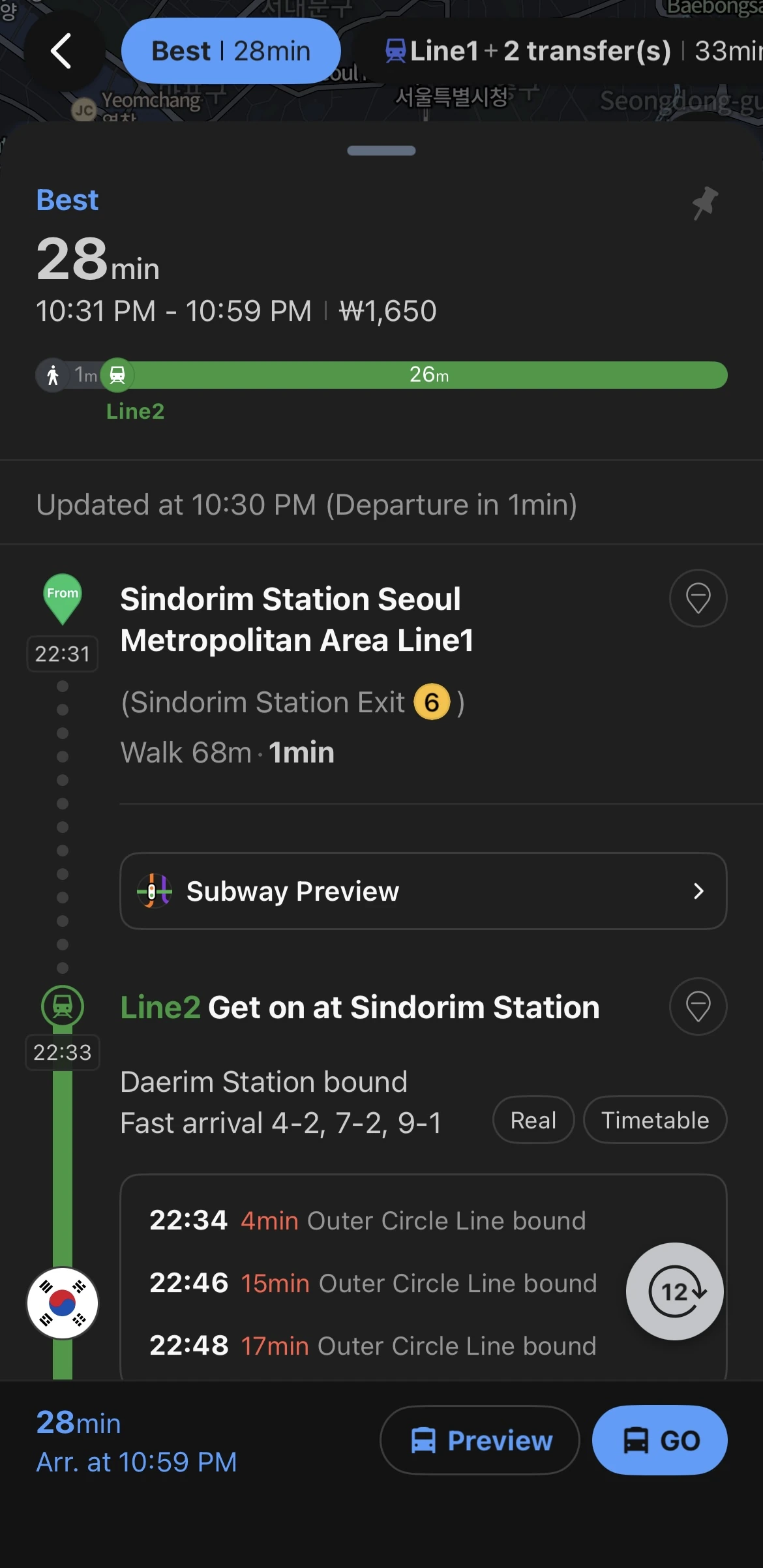
How to use this: Before you step on the train, glance at the platform’s electronic sign. The final destination shown there should match the direction Naver told you. On Line 2 especially, double-check whether you need inner loop (내선) or outer loop (외선) — the signs will show this in Korean and English.
2. Best Transfer Car Number (Cut Your Transfer Time in Half)
Here’s something that surprised me when I first moved here — Seoul’s transfer tunnels can be long. At stations like Sindorim or City Hall, you might walk 5–7 minutes underground just to switch lines. That’s fine if you’re early, but brutal if you’re rushing or dragging a suitcase.
Naver Map tells you exactly which train car to board for the fastest transfer. Tap into the detailed route view, then tap the transfer step — you’ll see numbers like [5-4] or [3-1].
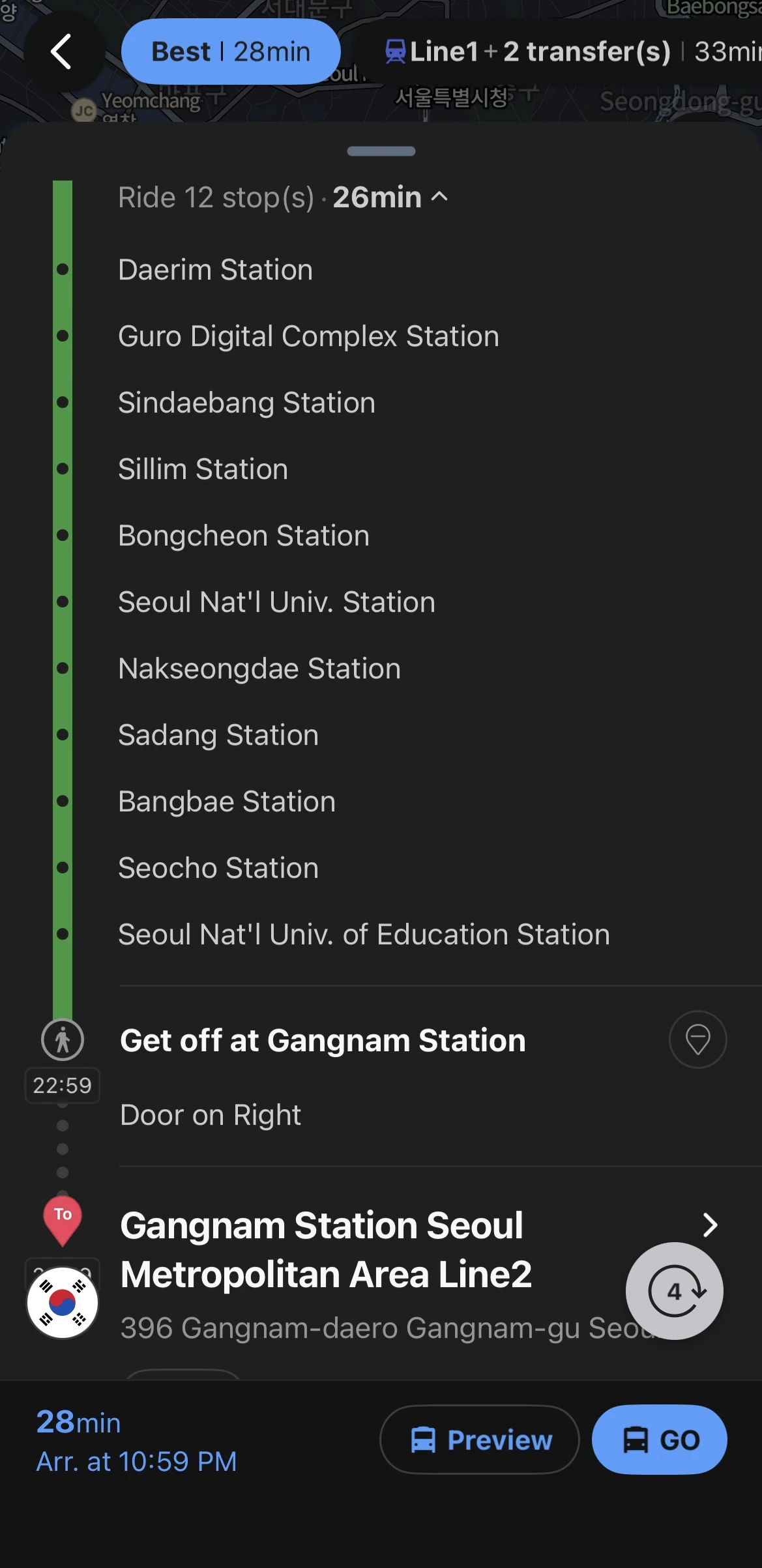
What the numbers mean:
- [3-1] = Car 3, Door 1
- [7-2] = Car 7, Door 2
- [9-1] = Car 9, Door 1
Board near that car and door, and when you get off, the transfer tunnel entrance will be right there. No more walking the entire platform length.
💡 Pro tip: This is a lifesaver when you’re coming from Incheon Airport with luggage. Less walking = less sweating = better arrival vibes.
3. Best Exit Number (Stop Wandering Around at Street Level)
Seoul subway stations often have 8–12 exits. Gangnam Station has 11. Exit the wrong one and you’ll spend 10 minutes walking back to where you actually needed to be.
When you search a destination, Naver shows the closest exit right in the final step — something like “Exit 3 is closest” or just “Exit 6” next to the station name.
How to remember it: Screenshot the route before you go underground (you’ll lose signal on some lines). Inside the station, just follow the signs with your exit number — they’re posted everywhere in Korean, English, and Chinese.
Real-Time Bus Tracking — Know Exactly When Your Bus Arrives
Buses in Seoul go places the subway doesn’t — neighborhoods, hillside areas, places near palaces. But standing at a stop wondering if your bus already passed? That’s no fun.
Naver Map’s real time bus tracking seoul feature is honestly one of the best parts of the app.
How to Check Live Bus Arrivals
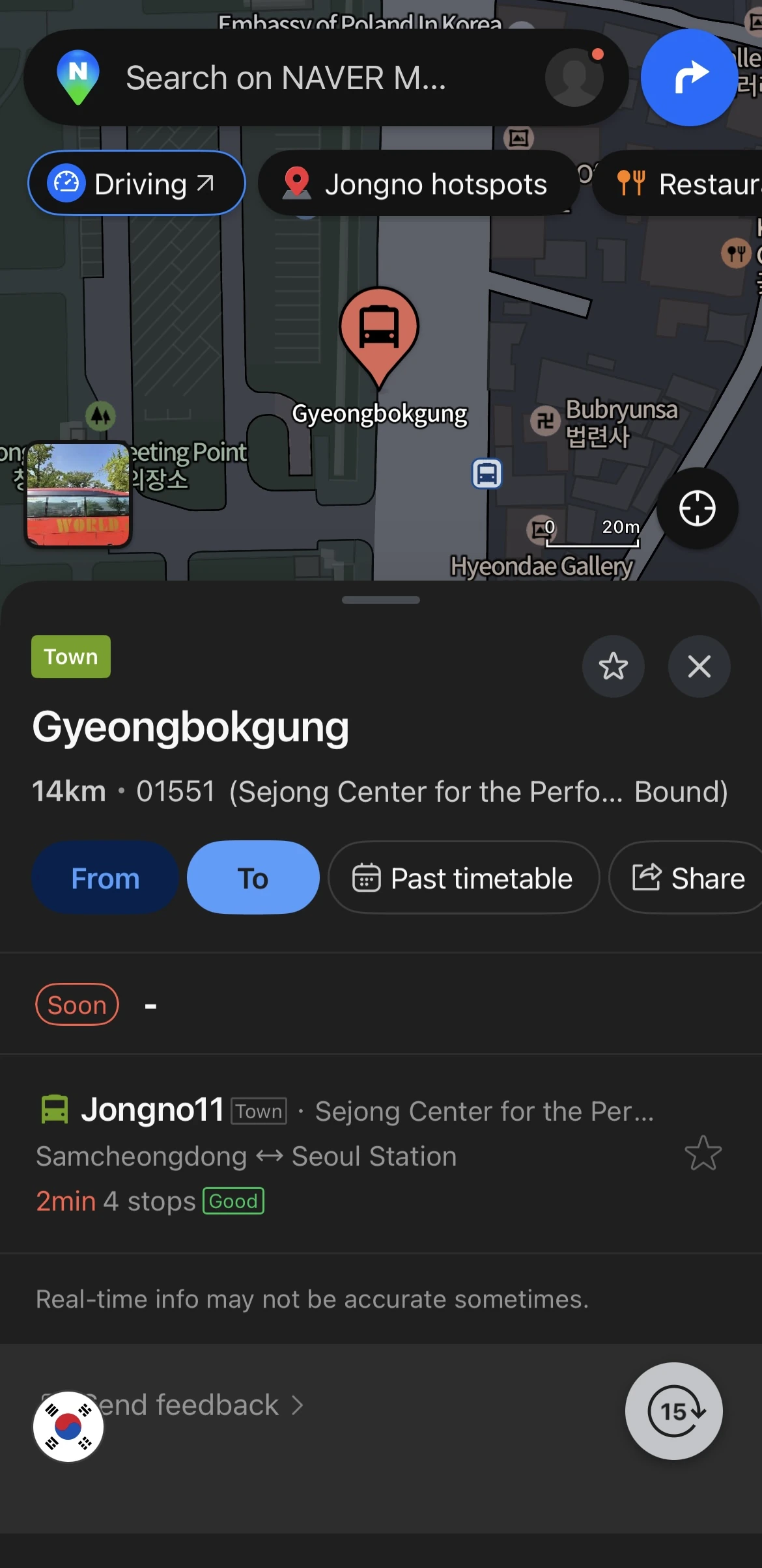
Method 1 — Tap the Bus Stop on the Map
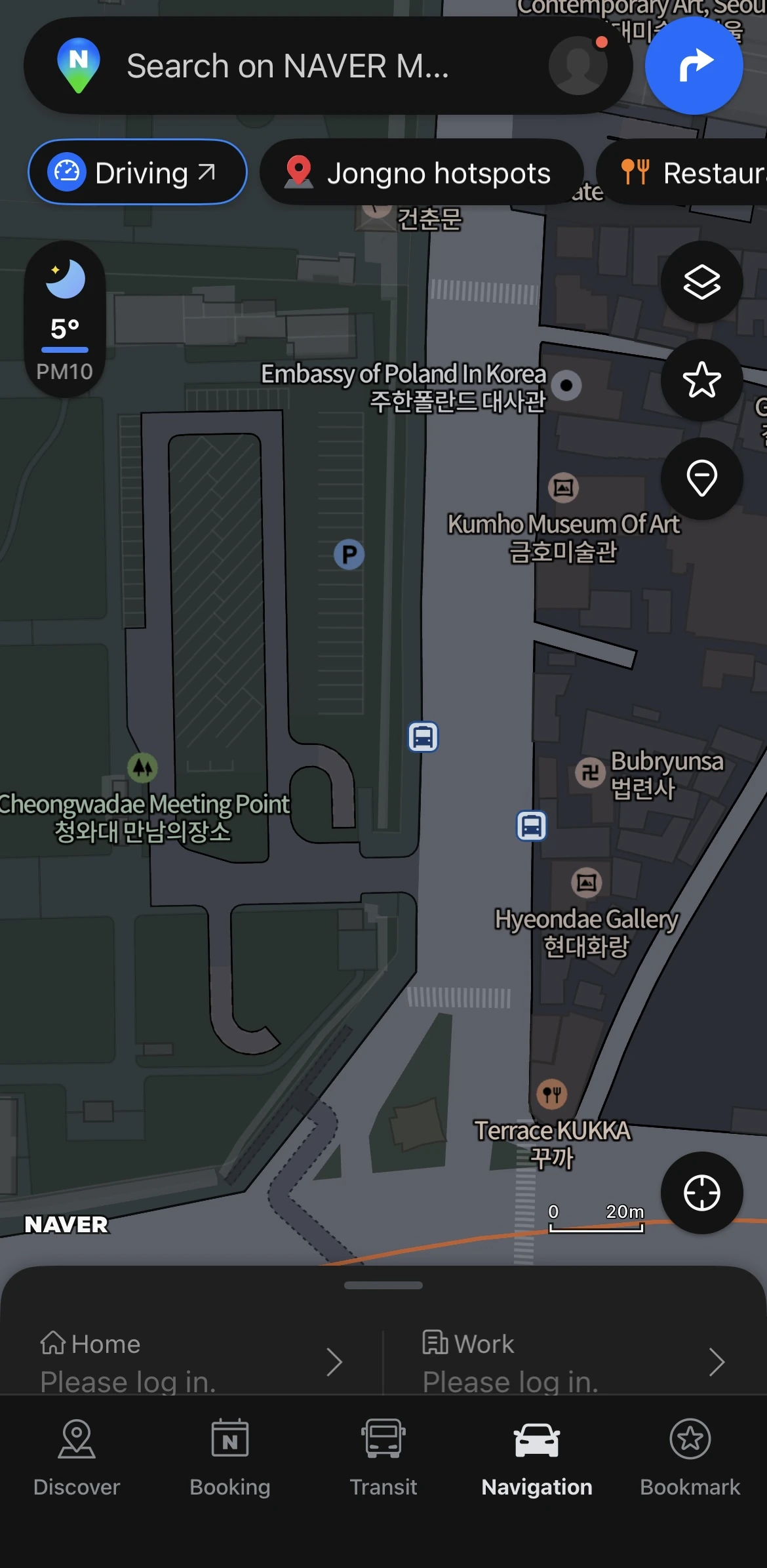
- Zoom in until you see bus stop icons (they look like little bus signs).
- Tap the stop you’re standing at.
- A list pops up showing every bus that stops there.
- Tap any bus number — it’ll show you “Arriving in 2 min” or “5 min / 3 stops away”.
Method 2 — Check After Route Search
When you search directions to somewhere, tap the Bus tab. Naver automatically shows you the next bus arrival time for the recommended routes.
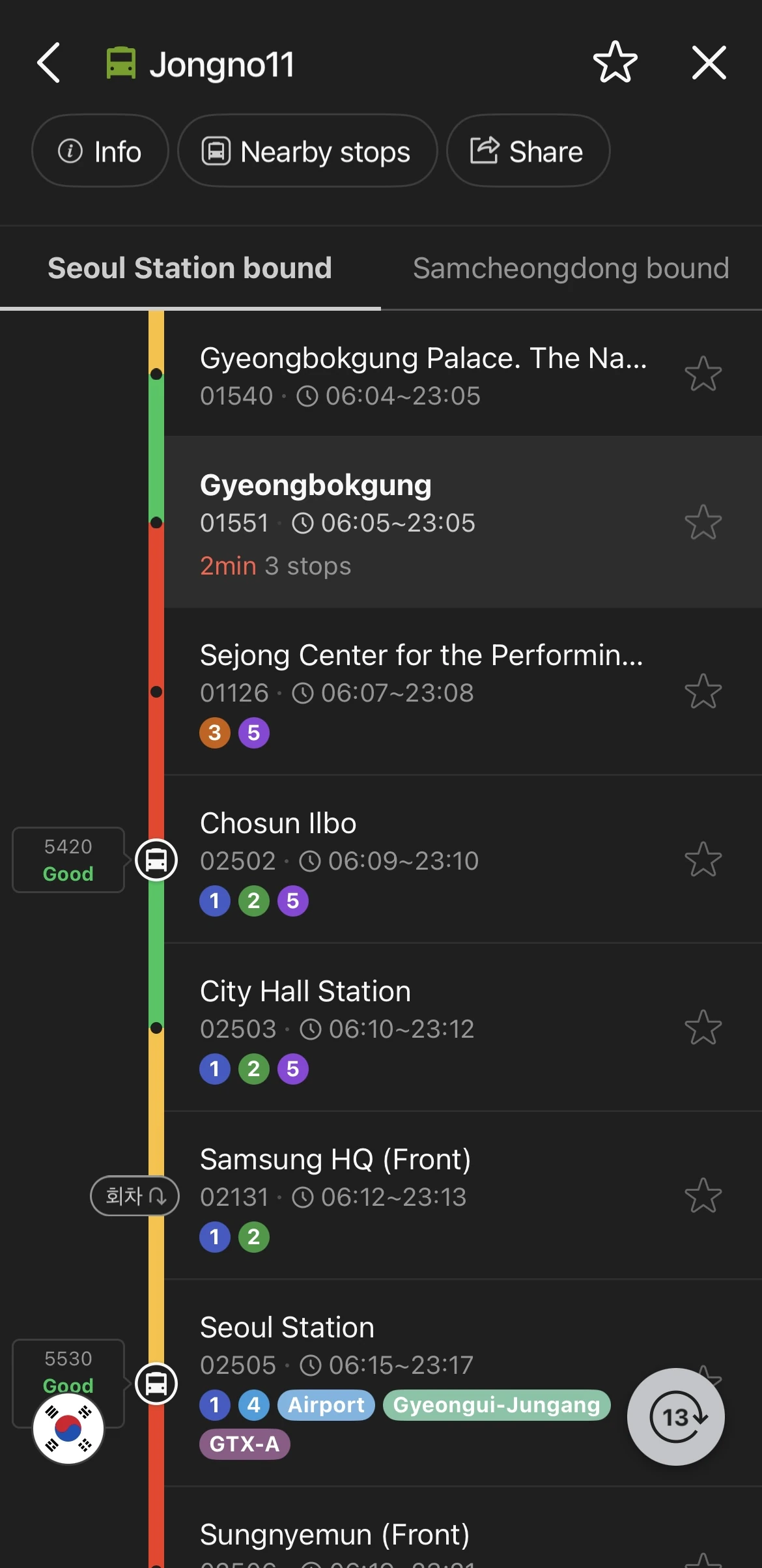
See the Actual Bus Moving on the Map
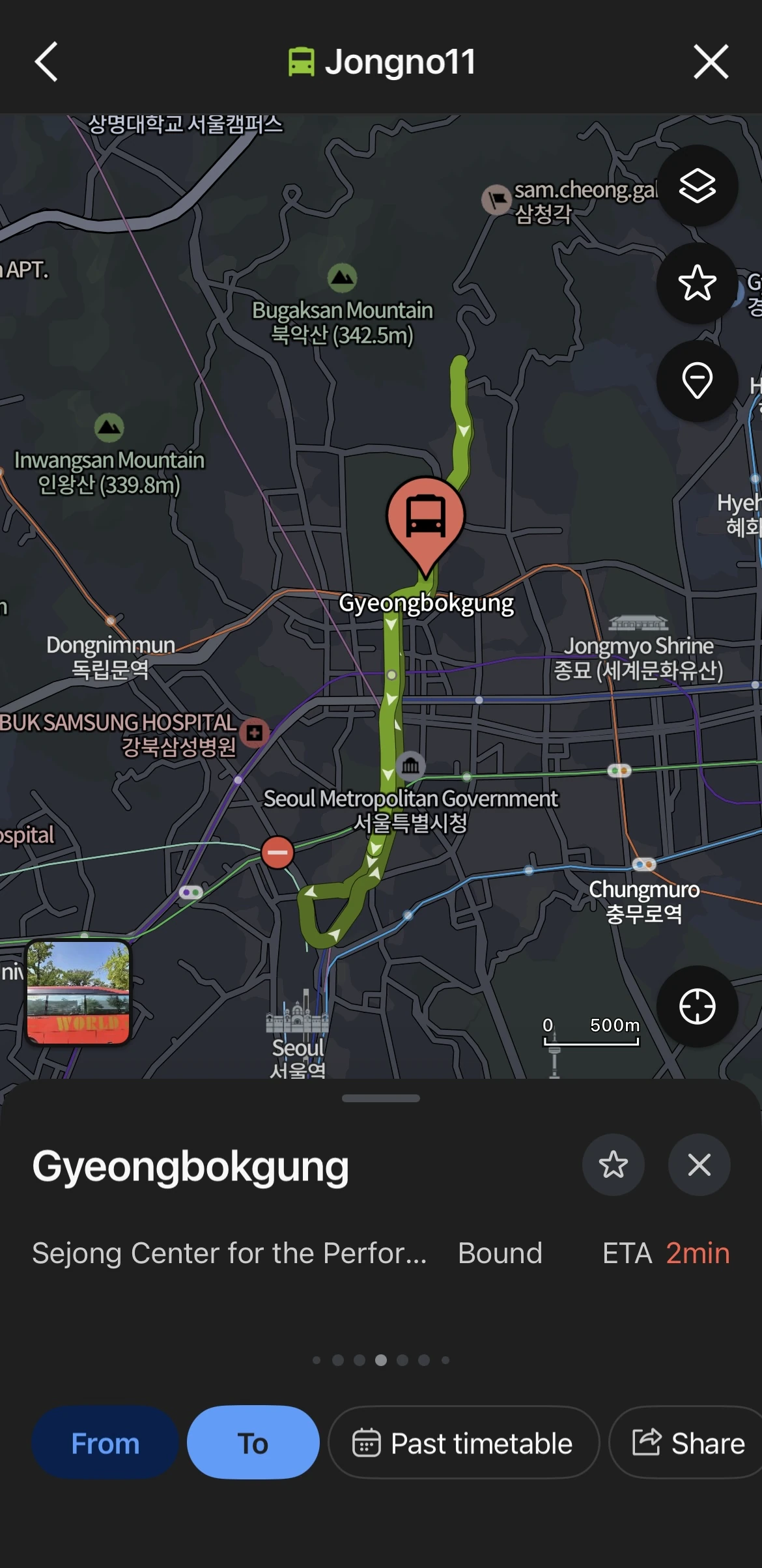
This is wild — tap a bus route number and Naver shows you the entire route drawn on the map, plus station markers showing each stop along the subway line. You can literally watch your bus approach in real time.
Why this matters:
- If the next bus is 15 minutes out and stuck in traffic, you can switch to the subway instead.
- If it says “Arriving Soon”, get ready to board — it’s at the previous stop.
- You’ll know if it’s worth waiting or if you should just walk.
T-Money Card: Why You Must Tap On AND Tap Off
You’ll need a T-money card (or any Korean transit card) to ride Seoul’s subway and buses. You can buy one at any convenience store near the airport or at subway station kiosks — they cost around ₩3,000–5,000 ($2.50–4), and you load them with cash at machines in stations or at convenience store counters.
Here’s the part that trips up a lot of visitors: you need to tap twice — once when you board, once when you exit.
T-Money Card Tap On Tap Off Rules
| When | Where | Why It Matters |
|---|---|---|
| Boarding (Tap On) | Bus: card reader at front door Subway: turnstile gate | Charges base fare (₩1,500 subway / ₩1,500 bus) |
| Exiting (Tap Off) | Bus: card reader at rear door Subway: exit turnstile | Enables transfer discounts & calculates distance fare |
What happens if you forget to tap off:
- You lose your transfer discount (normally you get a discount if you transfer within 30 minutes).
- On buses, the system assumes you rode to the last stop — the maximum fare gets deducted next time you tap.
- On long subway rides, the extra distance charge won’t calculate properly, and it’ll hit your card later.
⚠️ Traveling with friends? Here is a strict rule: Subways require one card per person. You cannot share a card at the subway gates. However, on buses, you can share one card. Tell the driver how many passengers, wait for them to adjust the machine, and then tap the card just once for the entire group. When you get off, tap it once again.
You can check your card balance on any subway gate reader or by tapping it at a convenience store without buying anything — the screen shows your remaining balance in Korean won.
Route Filters — Match Transportation to Your Situation
Naver doesn’t just show you the fastest route. After you search, tap the Filter button at the top — you’ll get options that actually matter depending on your situation.
| Filter | What It Does | When to Use It |
|---|---|---|
| Minimum Transfers | Fewest line changes | You have a suitcase, stroller, or elderly family member |
| Minimum Walking | Shortest walking distance | Tired feet, heavy bags, rainy weather |
| Fastest Route | Least total travel time | You’re running late for a reservation |
| Subway Only | Excludes buses | Rush hour traffic or unfamiliar with bus routes |
Real scenarios where I use these:
- Airport to hotel: I pick Minimum Transfers + Minimum Walking. Hauling a suitcase through three transfer tunnels is miserable.
- Rush hour (7:30–9 AM, 6–8 PM): Subway Only. Seoul traffic is brutal, and buses get stuck. Subway runs on time.
- Late for dinner in Gangnam: Fastest Route, even if it means two transfers. Sometimes 8 minutes matters.
Last Train Times & Night Travel Options
Seoul subway lines mostly stop running between 11:30 PM and midnight. If you’re out late in Hongdae or Itaewon, you need to plan ahead — or you’ll be stuck paying for a taxi (which isn’t cheap after midnight due to late-night surcharges).
Check Last Train Times in Naver Map
- Search your route as usual.
- Tap the Time button at the top.
- Set your departure time to something like 11:30 PM.
- Naver shows you the last available train. If nothing’s available, it’ll say “No transit available” and suggest alternatives.
If you see that message, here are your three backup options:
Option 1: Night Buses (Owl Bus)
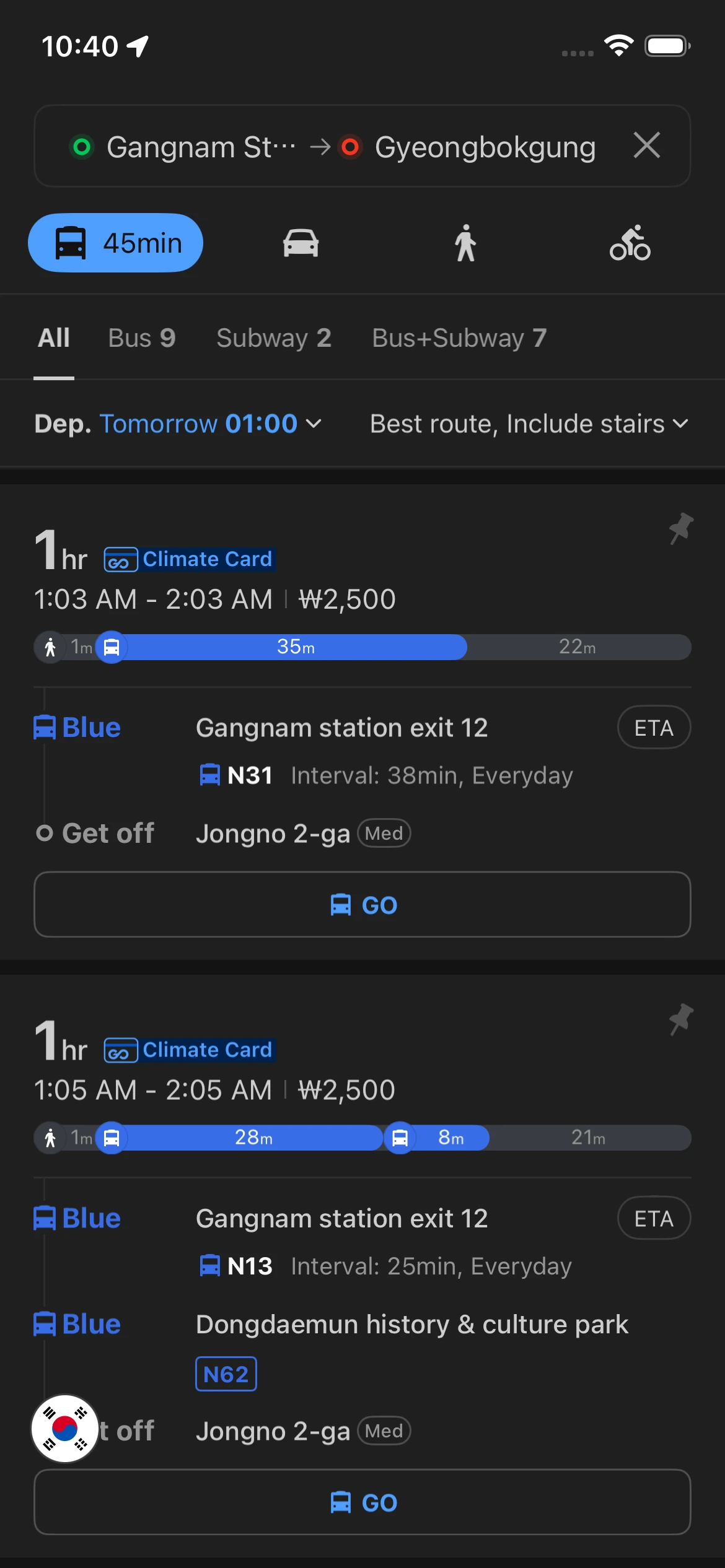
Seoul runs night buses (routes starting with “N” — like N13, N16, N61) from midnight to around 5 AM. They cover major routes between neighborhoods and downtown. Naver Map automatically includes these when you search during late-night hours.
Fare is the same as daytime buses (₩1,500 base), and yes, your T-money card works.
Option 2: Check Estimated Taxi Fare First
Tap the Taxi tab in your search results — Naver shows you the estimated fare and travel time before you even hail one. This way you’re not surprised when the meter hits ₩25,000 for a cross-city ride.
Late-night surcharge: Taxis add a 20% surcharge from midnight to 4 AM. Budget accordingly.
💡 You can copy the destination address from Naver and paste it into Kakao T (Korea’s main taxi app) to request a ride. I’ll cover this in detail in Part 3 of this series.
Option 3: Extended Service on Holidays
On New Year’s Eve, Chuseok (Korean Thanksgiving), and sometimes during festivals, Seoul Metro runs extended service until 2 AM or later. Naver Map updates these schedules automatically, so if you search a route on one of those nights, extended trains will show up in your results.
FAQ: Naver Map for Seoul Transit
Does Naver Map work offline for subway routes?
Partially. If you’ve already loaded a route while online, the step-by-step directions stay visible even if you lose signal underground. But you can’t search new routes offline — download your route before entering the station. For full offline maps, check out Part 1 where I explain how to save areas for offline use.
Can I use Naver Map in English?
Yes — go to Settings (the gear icon) and change the language to English. Most station names, bus numbers, and directions will display in English. Some smaller bus stop names might still show in Korean, but major stops and subway stations are fully translated.
What if the subway exit I need is closed?
Some exits close at night (usually smaller exits at large stations). Naver Map doesn’t always show this in real time. If you arrive and your exit is blocked, just use the next closest one — stations usually have signs directing you to alternate exits. You can also ask station staff (they typically understand basic English like “Exit 5?”).
Do I need mobile data, or can I use subway WiFi?
Seoul subway has free WiFi in stations (look for “@Seoul WiFi” or “Olleh WiFi”), but it’s spotty and requires login. I’d recommend getting a tourist SIM card or eSIM with data — they’re cheap (₩15,000–30,000 / $12–25 for 5–10 days) and make everything easier. You can buy them at Incheon Airport right after you clear customs.
This is Part 2 of the Naver Map series. Up next in Part 3, I’ll show you how to save places into folders, visualize your daily route on a map, plan inter-city trips using KTX trains, and coordinate taxi pickups using Kakao T integration. If you’ve got questions about using Naver Map for Seoul transit — or you’re stuck on something I didn’t cover — drop a comment below and I’ll help you out.